
Hostinger AI Builder 手动模式下单独修改特定页面页眉颜色教程
在 Hostinger AI Builder 手动模式下,默认情况下只会设置一种页眉背景颜色。你可以让页眉保持透明,使其与每个页面第一个区块的颜色保持一致;也可以使用自定义代码,在不同页面上设置不同的页眉颜色。
启用透明页眉
- 点击 Edit header(编辑页眉):


- 打开 Style(样式)选项卡,并开启 Transparent header(透明页眉)开关。在本例中,页眉会变为紫色,即采用页面顶部关于免运费的窄区块的颜色:
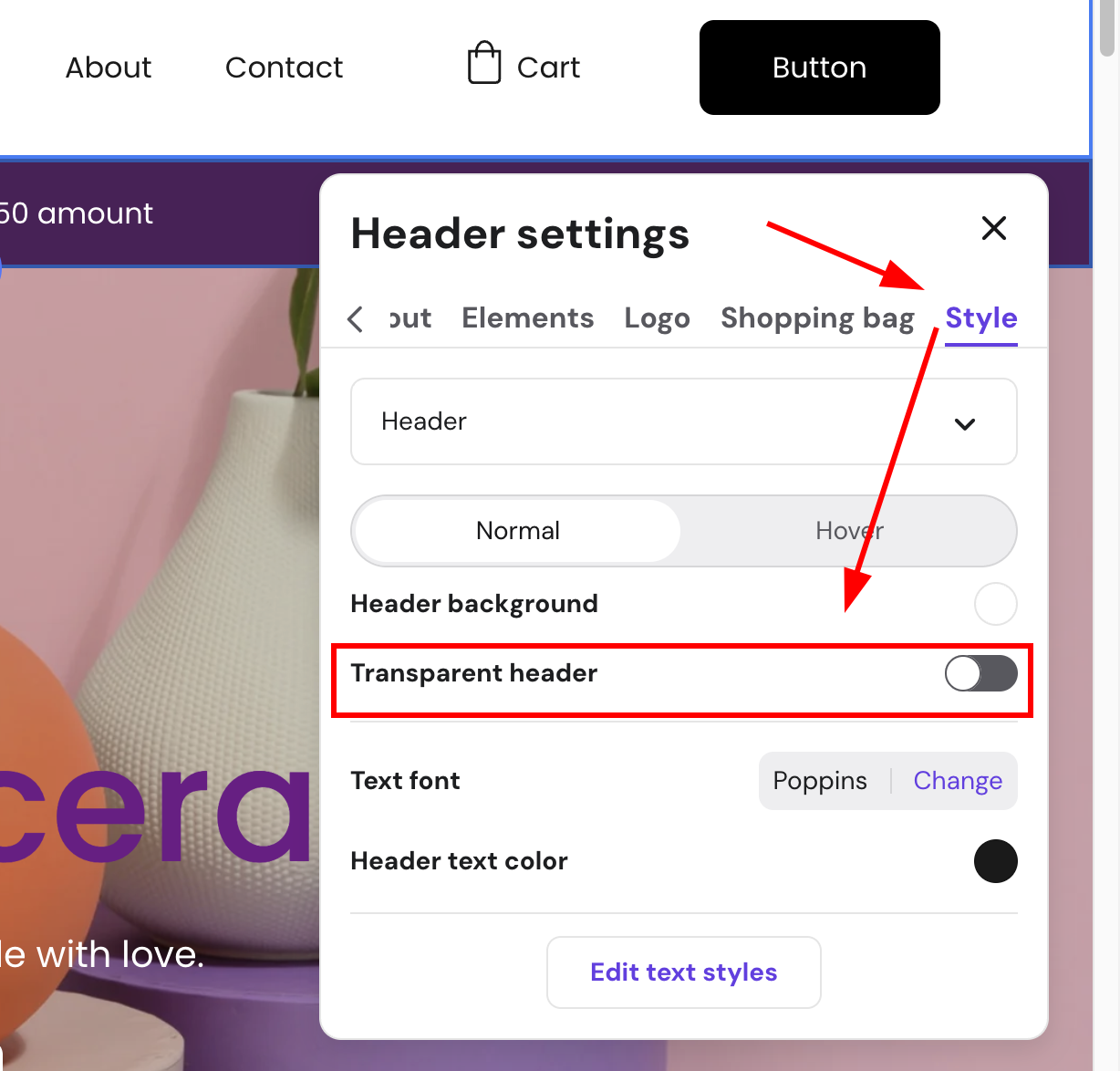
此外,如果你想在不同的页面上使用不同的页眉背景颜色,可以通过自定义代码来实现。
通过自定义代码所做的更改将在预览模式和已上线网站中可见,但在编辑器中不可见。
使用自定义代码为每个页面设置不同的页眉颜色
- 根据你的需求(针对某一个特定页面、多个页面,或除某个页面外的所有页面),将下方对应的代码复制到纯文本编辑器中。
- 自定义代码:
- 将
'#f00'替换为你喜欢的颜色名称(如'green')或十六进制颜色码(如'#008000')。 - 将页面路径(如
'/contact')替换为你要设置的目标页面的 slug(别名)。
- 将
- 在 AI Builder 中,进入 (⋯) 更多 → Integrations(集成)。
- 将代码粘贴到 Custom code(自定义代码)字段中,并保存更改。
- 发布你的网站以使更改生效。
什么是 slug?
slug 是 URL 中用于标识网站上特定页面的部分。例如:
https://domain.tld/contact→/contacthttps://domain.tld/about-us→/about-us
若要作用于首页,只需使用/。
更改某一个特定页面的页眉背景颜色
复制以下代码并进行自定义:
更改多个页面的页眉背景颜色
复制以下代码并进行自定义:
<script> let newHeaderColor = '#f00'; setInterval(() => { if (document.querySelector('.background')) { if (window.location.pathname === '/' || window.location.pathname === '/contact') { document.querySelector('.background').style.backgroundColor = newHeaderColor; document.querySelectorAll('.block-header-item__dropdown').forEach(dropdown => { dropdown.style.backgroundColor = newHeaderColor; }) } else { document.querySelector('.background').style.backgroundColor = ''; document.querySelectorAll('.block-header-item__dropdown').forEach(dropdown => { dropdown.style.backgroundColor = ''; }) } } });</script>- 如需在更多页面上更改页眉颜色,请复制这部分代码:
|| window.location.pathname === '/contact'- 更改其中的 slug(
/contact)并将其添加到语句末尾,例如:
if (window.location.pathname === '/contact' || window.location.pathname === '/about-us' || window.location.pathname === '/blog')更改除某个页面外所有页面的页眉背景颜色
复制以下代码并进行自定义:
<script> let newHeaderColor = '#f00'; setInterval(() => { if (document.querySelector('.background')) { if (window.location.pathname !== '/') { document.querySelector('.background').style.backgroundColor = newHeaderColor; document.querySelectorAll('.block-header-item__dropdown').forEach(dropdown => { dropdown.style.backgroundColor = newHeaderColor; }) } else { document.querySelector('.background').style.backgroundColor = ''; document.querySelectorAll('.block-header-item__dropdown').forEach(dropdown => { dropdown.style.backgroundColor = ''; }) } } });</script>现在,在你配置的各个页面上,页眉都会显示你选择的颜色。